Cloudflare Turnstile is a captcha that most visitors never have to click. The browser solves a challenge in the background, the widget hands your form a token, and your server asks Cloudflare whether that token is real. The server half is the part people get wrong: they check the token in one controller, forget it in the next, or skip the hostname check.
In NestJS that check belongs in a guard, so it runs before any handler and lives in one place. I maintain nest-cloudflare-turnstile, a module that does exactly that. This post walks through adding Turnstile to a NestJS app with it, from the Cloudflare dashboard to tests. Every response below is real output from the module's example app.
How the Turnstile token flow works
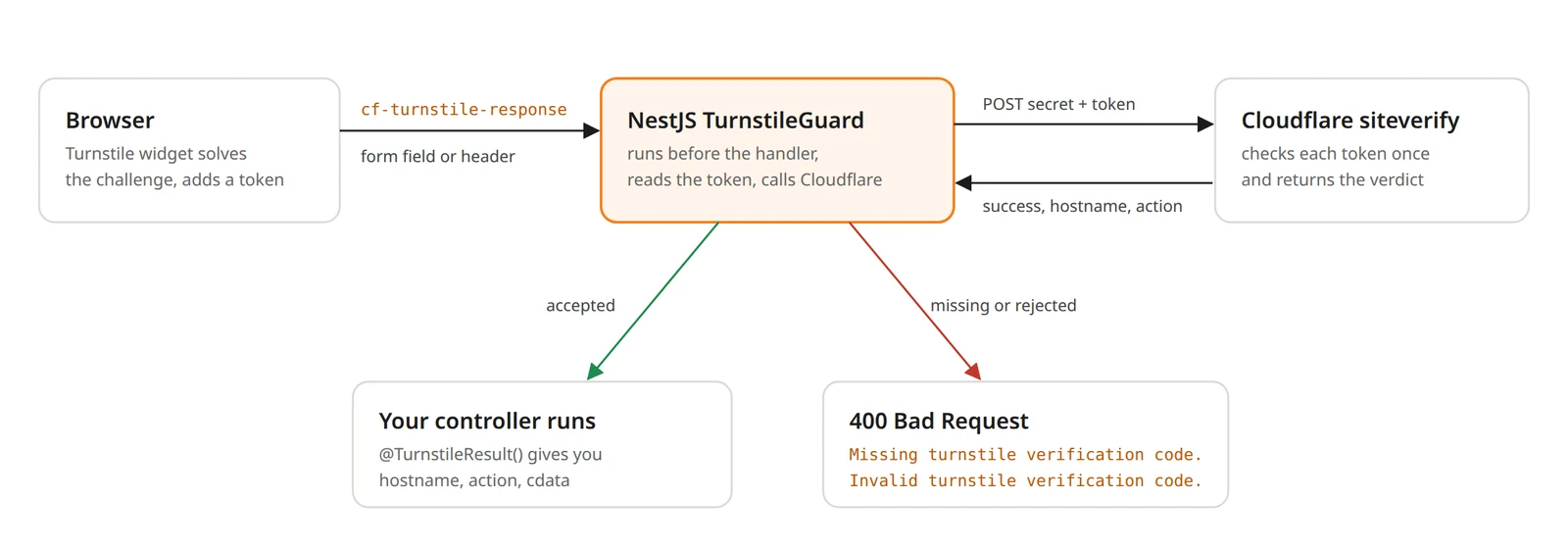
- The Turnstile widget on your page runs a challenge and puts a token into a hidden form field called
cf-turnstile-response. - Your NestJS route receives the token, in that form field or in a header with the same name.
- The guard sends the token and your secret key to Cloudflare's siteverify endpoint.
- Cloudflare answers with
success, thehostnamethe widget ran on and theactionit was given. Each token works once and expires after five minutes. - If Cloudflare accepted the token, your controller runs. If not, the request stops with a 400.
The rule that matters: the widget on its own protects nothing. A bot can skip your page and post straight to the API. Only the server-side check in step 3 stops it.
Step 1: create a Turnstile widget in Cloudflare
In the Cloudflare dashboard, open Turnstile and add a widget. Give it the hostnames it will run on (for example example.com and localhost for development) and pick a widget mode. Cloudflare gives you two keys:
- a site key, which is public and goes into your HTML
- a secret key, which stays on the server and goes into an environment variable
TURNSTILE_SECRET_KEY=0x4AAAAAAA...
You don't need a widget to follow along. Cloudflare publishes test keys, covered further down, and the examples here use them.
Step 2: install nest-cloudflare-turnstile
npm install nest-cloudflare-turnstile
The module works with NestJS 10, 11 and 12, on Express or Fastify, and has no runtime dependencies besides Nest. It needs Node.js 20 or later. Register it once with your secret key:
import { Module } from '@nestjs/common';
import { TurnstileModule } from 'nest-cloudflare-turnstile';

@Module({
  imports: [
    TurnstileModule.forRoot({
      secretKey: process.env.TURNSTILE_SECRET_KEY,
    }),
  ],
})
export class AppModule {}
If your config comes from @nestjs/config, use forRootAsync:
import { ConfigModule, ConfigService } from '@nestjs/config';
import { TurnstileModule } from 'nest-cloudflare-turnstile';

TurnstileModule.forRootAsync({
  imports: [ConfigModule],
  inject: [ConfigService],
  useFactory: (config: ConfigService) => ({
    secretKey: config.getOrThrow<string>('TURNSTILE_SECRET_KEY'),
  }),
});
The module is global, so feature modules can use the guard without importing it again. The app refuses to start with an empty secretKey, which is better than finding out in production that every request is let through.
Step 3: render the Turnstile widget
In a plain HTML form, load Cloudflare's script and drop in a div with your site key. The widget adds the hidden cf-turnstile-response field to the form by itself:
<script
  src="https://challenges.cloudflare.com/turnstile/v0/api.js"
  async
  defer
></script>

<form action="/contact" method="POST">
  <textarea name="message"></textarea>
  <div class="cf-turnstile" data-sitekey="YOUR_SITE_KEY"></div>
  <button type="submit">Send</button>
</form>
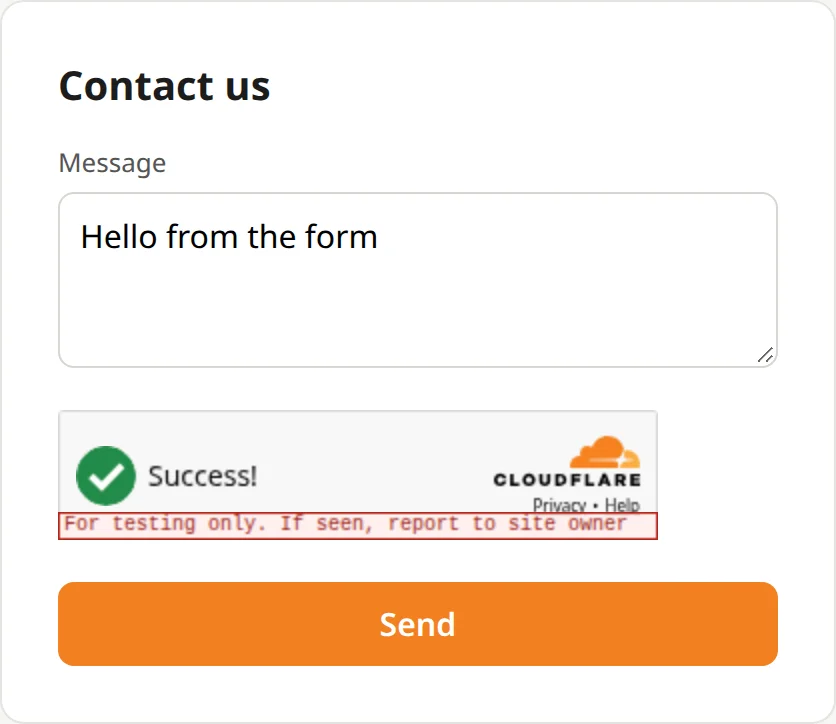
With a frontend framework, read the token from the Turnstile component and send it in the cf-turnstile-response header, which the guard also reads. In React with @marsidev/react-turnstile:
import { Turnstile } from '@marsidev/react-turnstile';
import type { TurnstileInstance } from '@marsidev/react-turnstile';
import { useRef, type FormEvent } from 'react';

export function LoginForm() {
  const turnstile = useRef<TurnstileInstance | null>(null);

  async function handleSubmit(event: FormEvent<HTMLFormElement>) {
    event.preventDefault();
    const form = new FormData(event.currentTarget);
    await fetch('/auth/login', {
      method: 'POST',
      headers: {
        'content-type': 'application/json',
        'cf-turnstile-response': turnstile.current?.getResponse() ?? '',
      },
      body: JSON.stringify({ email: form.get('email') }),
    });
    turnstile.current?.reset();
  }

  return (
    <form onSubmit={handleSubmit}>
      <input name="email" type="email" />
      <Turnstile ref={turnstile} siteKey="YOUR_SITE_KEY" />
      <button type="submit">Log in</button>
    </form>
  );
}
Note the reset() at the end. Cloudflare accepts each token once, so the widget needs a fresh one before the next request. The module's frontend guide has the same example for Next.js Server Actions, Vue and Angular.
Step 4: protect a NestJS route with the guard
Put @TurnstileCaptcha() on a route, or on a whole controller:
import { Body, Controller, Post } from '@nestjs/common';
import { TurnstileCaptcha, TurnstileResult } from 'nest-cloudflare-turnstile';
import type { TurnstileVerifyResponse } from 'nest-cloudflare-turnstile';

@Controller('contact')
export class ContactController {
  @Post()
  @TurnstileCaptcha()
  send(
    @Body() body: { message?: string },
    @TurnstileResult() result: TurnstileVerifyResponse,
  ) {
    return { message: body.message, solvedOn: result.hostname };
  }
}
The handler only runs after Cloudflare accepted the token. @TurnstileResult() gives you what Cloudflare returned, including hostname, action and cdata. Import TurnstileVerifyResponse with import type: with isolatedModules and emitDecoratorMetadata both on, TypeScript requires it for interfaces in decorated parameters.
What the guard returns
These come from running the example app with Cloudflare's always-passes test secret. A request with no token stops at the guard:
curl -i -X POST localhost:3000/contact \
  -H 'content-type: application/json' \
  -d '{"message":"hi"}'
HTTP/1.1 400 Bad Request
{"message":"Missing turnstile verification code.","error":"Bad Request","statusCode":400}
With a token in the body, the controller runs:
curl -i -X POST localhost:3000/contact \
  -H 'content-type: application/json' \
  -d '{"message":"hi","cf-turnstile-response":"XXXX.DUMMY.TOKEN.XXXX"}'
HTTP/1.1 201 Created
{"message":"hi","solvedOn":"example.com"}
The token works in a header too (-H 'cf-turnstile-response: XXXX.DUMMY.TOKEN.XXXX') with the same result. When Cloudflare rejects the token, the guard answers with a different message:
HTTP/1.1 400 Bad Request
{"message":"Invalid turnstile verification code.","error":"Bad Request","statusCode":400}
To return a 401 or 403 instead, or your own message, pass exceptionFactory:
import { ForbiddenException } from '@nestjs/common';

TurnstileModule.forRoot({
  secretKey: process.env.TURNSTILE_SECRET_KEY,
  exceptionFactory: (reason, { errorCodes }) =>
    new ForbiddenException({
      message:
        reason === 'missing'
          ? 'Please complete the challenge.'
          : 'The challenge expired, please try again.',
      errorCodes,
    }),
});
Problems on your side, such as a wrong secret key or Cloudflare being unreachable, are a different case. They return a 500 and reach the onError hook, so you can log them without mixing them up with bots. The module retries siteverify once when it fails, and its errors never contain your secret key.
Cloudflare Turnstile test keys
Cloudflare publishes keys that skip the real challenge. Pair a test site key in the browser with a test secret key on the server:
| Site key | Widget behavior |
|---|---|
1x00000000000000000000AA | Always passes, visible |
2x00000000000000000000AB | Always fails, visible |
1x00000000000000000000BB | Always passes, invisible |
2x00000000000000000000BB | Always fails, invisible |
3x00000000000000000000FF | Forces an interactive challenge |
| Secret key | Siteverify answer |
|---|---|
1x0000000000000000000000000000000AA | Always passes |
2x0000000000000000000000000000000AA | Always fails (invalid-input-response) |
3x0000000000000000000000000000000AA | Token already spent (timeout-or-duplicate) |
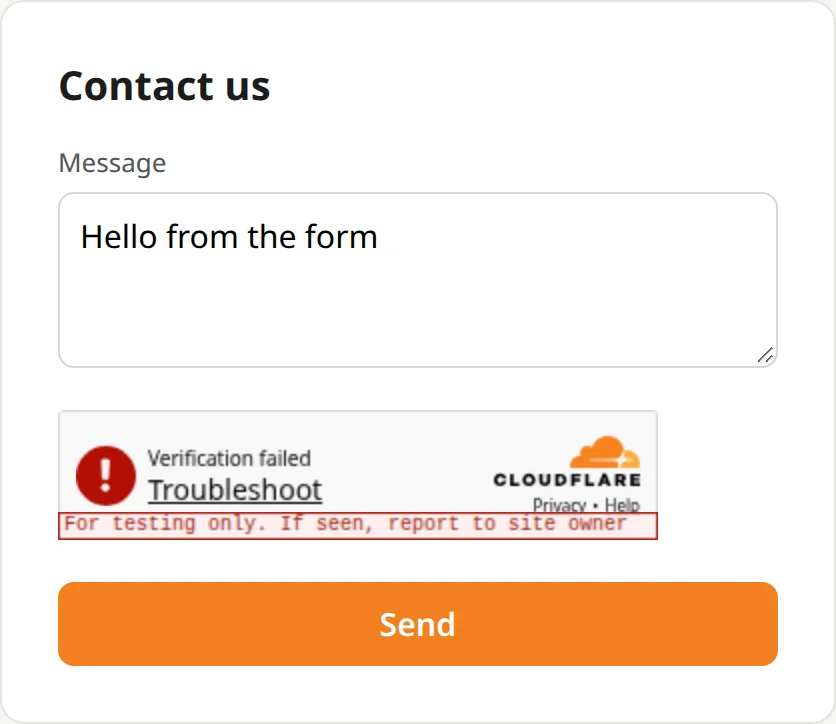
Test site keys produce the dummy token XXXX.DUMMY.TOKEN.XXXX, which only test secret keys accept. That is the token in the curl examples above. Here is the always-fails site key in the same form:
One warning: 1x0000000000000000000000000000000AA lets every request with a token through. If it ends up in production by mistake, nothing is protected, so the module logs a warning when it runs with that key and NODE_ENV=production.
Check the hostname and the action
A token proves that someone solved a challenge, but not on which site. Cloudflare recommends checking that the hostname matches yours, so tokens solved on another site that uses the same widget can't be replayed against your API:
TurnstileModule.forRoot({
  secretKey: process.env.TURNSTILE_SECRET_KEY,
  expectedHostname: ['example.com', 'www.example.com'],
});
Actions go one step further. Give each widget a data-action, then tell each route which action it accepts, so a token from the newsletter form can't open the login route:
<div class="cf-turnstile" data-sitekey="YOUR_SITE_KEY" data-action="login"></div>
@Controller('auth')
@TurnstileCaptcha({ action: ['login', 'signup'] })
export class AuthController {
  @Post('login')
  @TurnstileCaptcha({ action: 'login' })
  login() {}

  @Post('signup')
  signup() {}
}
The route's action wins over the controller's, and the token is still checked only once per request.
Protect every route with a global guard
For an API where almost everything should require a token, register the guard globally and exempt the few open routes, like health checks, with @SkipTurnstile():
import { Module } from '@nestjs/common';
import { APP_GUARD } from '@nestjs/core';
import { TurnstileGuard, TurnstileModule } from 'nest-cloudflare-turnstile';

@Module({
  imports: [
    TurnstileModule.forRoot({ secretKey: process.env.TURNSTILE_SECRET_KEY }),
  ],
  providers: [{ provide: APP_GUARD, useClass: TurnstileGuard }],
})
export class AppModule {}
import { Controller, Get } from '@nestjs/common';
import { SkipTurnstile } from 'nest-cloudflare-turnstile';

@Controller('health')
@SkipTurnstile()
export class HealthController {
  @Get()
  check() {
    return { status: 'ok' };
  }
}
The global guard also covers GraphQL resolvers, and WebSocket messages on NestJS 12. For GraphQL, send the token in the cf-turnstile-response header. For WebSockets, put it in each message. Since a token works once, every guarded field or message needs a fresh one, so one solved challenge can't cover a batch of login attempts.
Testing NestJS apps that use Turnstile
In tests that aren't about the captcha, turn the guard off:
TurnstileModule.forRoot({
  secretKey: process.env.TURNSTILE_SECRET_KEY,
  skipIf: process.env.NODE_ENV === 'test',
});
To test how your app handles a rejected token, swap the service for the stub the module ships. It answers without a network call:
import { Test } from '@nestjs/testing';
import {
  createTurnstileServiceStub,
  TurnstileService,
} from 'nest-cloudflare-turnstile';
import { AppModule } from '../src/app.module';

const moduleRef = await Test.createTestingModule({ imports: [AppModule] })
  .overrideProvider(TurnstileService)
  .useValue(createTurnstileServiceStub('fail'))
  .compile();
'pass', 'fail' and 'spent' behave like the matching test keys, and the rest of the module stays real, so your exceptionFactory runs as it would in production.
Cloudflare Turnstile vs reCAPTCHA
| Cloudflare Turnstile | Google reCAPTCHA | |
|---|---|---|
| What the server gets | Accept or reject | A score from 0.0 to 1.0 (v3) that you set a threshold for |
| Visitor experience | Usually no puzzle; an interactive check only when Cloudflare is unsure | v2 checkbox or image puzzles; v3 runs in the background |
| Free usage | Free plan with unlimited challenges, up to 20 widgets per account (Cloudflare plans) | 10,000 assessments per month per organization, then paid tiers (Google billing) |
| Needs a Cloudflare-proxied site | No, it works on any site | No |
The free usage numbers were current on the providers' pages when I wrote this; check them before you plan around them. For most forms I reach for Turnstile now: there's no score threshold to tune, and the free plan doesn't run out.
Migrating from @nestlab/google-recaptcha
If your NestJS app already uses @nestlab/google-recaptcha, most of the move is renaming:
GoogleRecaptchaModule.forRootbecomesTurnstileModule.forRoot@Recaptcha()becomes@TurnstileCaptcha()- the
scoreoption goes away, because Turnstile has no score
In the browser, swap the reCAPTCHA widget for the Turnstile one and send its token in cf-turnstile-response. The migration guide maps every option, decorator and error code.
FAQ
Is Cloudflare Turnstile free?
Yes. The free plan has unlimited challenges and allows up to 20 widgets per account. Enterprise adds things like more hostnames per widget and Ephemeral IDs.
Does my site need to be on Cloudflare to use Turnstile?
No. The widget and the siteverify API work on any site, proxied through Cloudflare or not.
Can I reuse a Turnstile token?
No. Cloudflare accepts each token once and expires it after five minutes. A second check of the same token returns timeout-or-duplicate, which the guard turns into an "Invalid" 400.
Where should I check the token, in a middleware, an interceptor or a guard?
A guard. Guards run before interceptors and pipes and decide whether the handler runs at all, which is exactly the question a captcha answers. They also see the route's metadata, which is how per-route actions and @SkipTurnstile() work.
How do I test without a real widget?
Use Cloudflare's test keys (1x00000000000000000000AA with 1x0000000000000000000000000000000AA) for end-to-end checks, skipIf to turn the guard off, or createTurnstileServiceStub to fake an answer in unit tests.
The module is MIT licensed, and the docs cover every option. If you need help adding Turnstile or anything else to a NestJS backend, I take on projects. For a comparison of NestJS itself with plain Express, see NestJS vs Express.